





Android Auto Finally Fixes Missing Signal Icon With New Update Article
Restoring the indicator makes the interface more informative and helps drivers understand possible connectivity problems more easily.

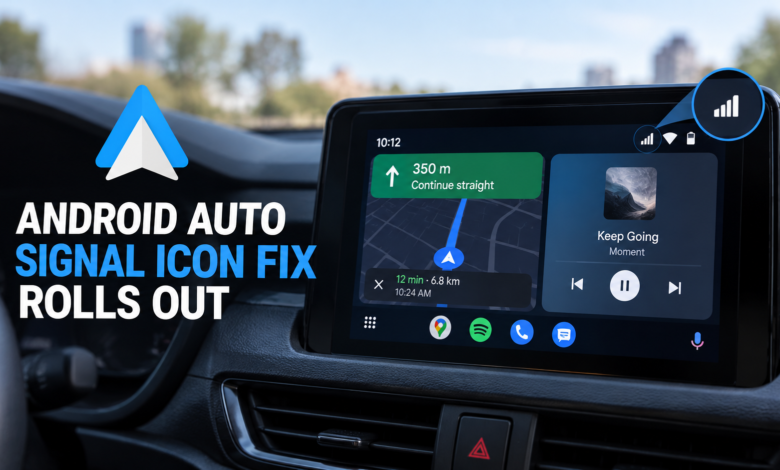
A small Android Auto bug has been frustrating drivers for months, removing a useful piece of information from their car’s dashboard. Now, Google is rolling out a fix that restores the missing cellular signal icon, helping users check their phone’s network reception directly from their vehicle’s infotainment screen.
Although the issue did not necessarily interrupt calls, navigation, or mobile data, it left drivers without a quick way to see how strong their cellular connection was. The good news is that Google has confirmed the fix is rolling out, and recent reports indicate that Android Auto version 17.8 is restoring the missing signal bars for more users.
Android Auto’s Missing Signal Icon Finally Returns
Android Auto provides a simplified interface for accessing navigation, calls, music, and compatible applications through a vehicle’s infotainment display. Its status bar normally shows useful details such as the time, phone battery level, notifications, and cellular signal strength.
However, a software bug caused the cellular signal indicator to disappear for some users. The problem continued for months, leaving an empty space where the signal bars would normally appear.
The missing icon was mainly a visibility issue rather than evidence that the phone had lost its network connection. Calls, navigation, and other connected services could continue working as long as the phone had reception.
Even so, the indicator is useful when travelling through areas with weak coverage. Without it, drivers had fewer clues about whether poor connectivity was affecting online navigation, streaming, or internet-based communication.
Android Auto Version 17.8 Appears to Include the Fix
Reports from users indicate that the signal icon has returned after installing Android Auto version 17.8. Google has confirmed that a fix is being rolled out, and the update is now reaching more users through the stable release channel.
However, the rollout is not universal yet. Some drivers may see the icon return before others, and the fix may depend partly on server-side changes rather than the app version alone.
Google has not published a detailed technical explanation of what caused the icon to disappear or exactly how the fix works.
For users still experiencing the problem, updating Android Auto is the best first step. If the icon does not immediately return, it may be necessary to wait for the fix to reach their device.
How to Check for the Android Auto Update
If the cellular signal icon is still missing from your car’s display, checking for an update is a sensible first step.

- Open the Google Play Store on your Android phone.
- Search for Android Auto.
- Open the app listing.
- Tap Update if the option is available.
- Reconnect your phone to your vehicle and check whether the signal indicator has returned.
You can also check the installed version by opening your phone’s Settings, selecting Apps, and choosing Android Auto. Menu names may differ slightly depending on your phone.
If Android Auto is already updated but the icon remains missing, clearing the app’s cache may help in some cases. Open Settings > Apps > Android Auto > Storage > Clear cache, then reconnect your phone to the car.
Clearing the cache removes temporary app files, not your personal documents. However, it may not resolve an issue that depends on a server-side rollout that has not yet reached your device.
Why the Cellular Signal Icon Matters
The signal indicator may look like a minor part of the Android Auto interface, but it can provide useful information while driving.
Cellular reception affects connected features such as live traffic updates, online maps, music streaming, and internet-based communication. When reception weakens, these services may become slower or temporarily unavailable.
The signal bars offer a quick visual indication of the phone’s connection without requiring drivers to pick up their phones. This can be particularly useful when travelling through rural areas, tunnels, or locations where network coverage changes frequently.
The missing icon did not automatically mean that Android Auto itself was disconnected. Instead, it removed a convenient way to check the phone’s cellular status from the dashboard.
Restoring the indicator makes the interface more informative and helps drivers understand possible connectivity problems more easily.
The Fix Is Rolling Out Gradually
Google frequently distributes software improvements in stages. Some fixes arrive through app updates, while others may depend on server-side changes that are enabled gradually.
As a result, two users running similar software versions may experience different behaviour. Some drivers may already have the signal icon back, while others may need to wait for the rollout to reach their devices.
Keeping Android Auto updated is a sensible precaution. However, there is no need to install unofficial software packages simply because the icon has not returned yet.
Waiting for the official rollout is generally the safer approach, particularly when the underlying problem is a display bug rather than a complete loss of connectivity.
What Could Google Improve Next?
The return of the signal indicator addresses one frustrating Android Auto issue, but it also highlights the importance of keeping essential status information consistent across different vehicles and phones.
Drivers benefit from an interface that presents useful information clearly while minimising distractions. Small reliability improvements can make a meaningful difference to everyday usability, even when they do not introduce entirely new features.
Google has not announced additional changes specifically related to this signal-icon problem. For now, the main improvement is the gradual restoration of the missing cellular indicator.
Final Verdict
Google is rolling out a fix for Android Auto’s missing cellular signal icon, with version 17.8 associated with the indicator’s return for many users.
The bug did not necessarily affect cellular connectivity itself, but it removed a useful way to check network reception from the car’s display. The fix restores that information and addresses a problem that persisted for months.
If the signal icon is still missing, check the Google Play Store for Android Auto updates and allow time for the rollout to reach your device. The fix is progressing, although availability may still vary between users.